---
title: "Retail Department Performance Analysis: Growth and Volatility"
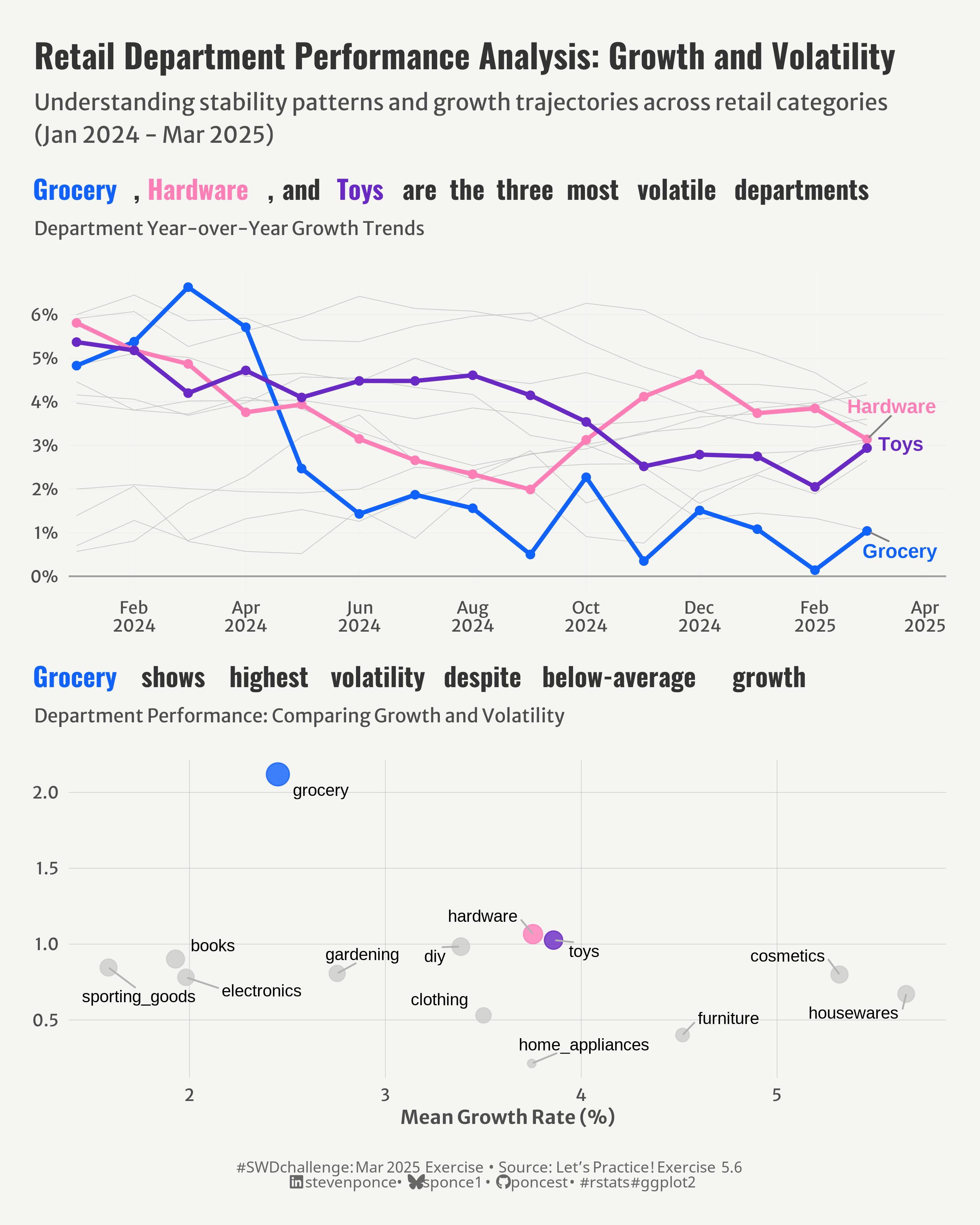
subtitle: "Understanding stability patterns and growth trajectories across retail categories (Jan 2024 - Mar 2025)"
description: "An in-depth analysis of retail department performance examining growth rates and volatility across multiple categories. This visualization highlights stability patterns and identifies departments with unpredictable performance, providing valuable insights for inventory management and business planning."
author: "Steven Ponce"
date: "2025-03-19"
categories: ["SWDchallenge", "SWD Exercise", "2025"]
date-modified: last-modified
tags: [
"retail analysis", "YoY growth", "volatility metrics",
"ggplot2", "time series visualization", "scatter plot",
"performance dashboard", "department comparison", "standard deviation", "business intelligence"
]
image: "thumbnails/swd_2025_03-Ex_0056.png"
format:
html:
toc: true
toc-depth: 5
code-link: true
code-fold: true
code-tools: true
code-summary: "Show code"
editor_options:
chunk_output_type: inline
execute:
freeze: true
cache: true
error: false
message: false
warning: false
eval: true
# share:
# permalink: "https://stevenponce.netlify.app/data_visualizations/SWD Challenge/2025/swd_2025_02-Ex_056.html"
# description: "Explore my latest data visualization project analyzing retail department growth patterns and volatility. This #SWDchallenge entry examines performance trends across multiple retail categories, highlighting stability patterns and outliers from Jan 2024 to Mar 2025. #DataViz #RetailAnalytics #ggplot2"
# linkedin: true
# twitter: true
# email: true
---
**Update**: This post has been updated based on valuable feedback from the Antti Rask. The changes include:
- Implemented a categorical color palette to create better visual distinction between the three highlighted departments
- Applied consistent colors across both visualizations to help readers connect departments between charts
- Created more descriptive titles with colored department names using the ggtext package to enhance immediate comprehension
- Revised the chart subtitles to better explain the key insights from each visualization
- Removed redundant axis titles while maintaining necessary labels for clarity
- Added specific emphasis on Grocery's unique position as highly volatile despite lower growth
- Improved the scatter plot to better highlight the relationship between growth rates and stability patterns
- Enhanced overall visual hierarchy by using color more purposefully throughout the visualization
### Original
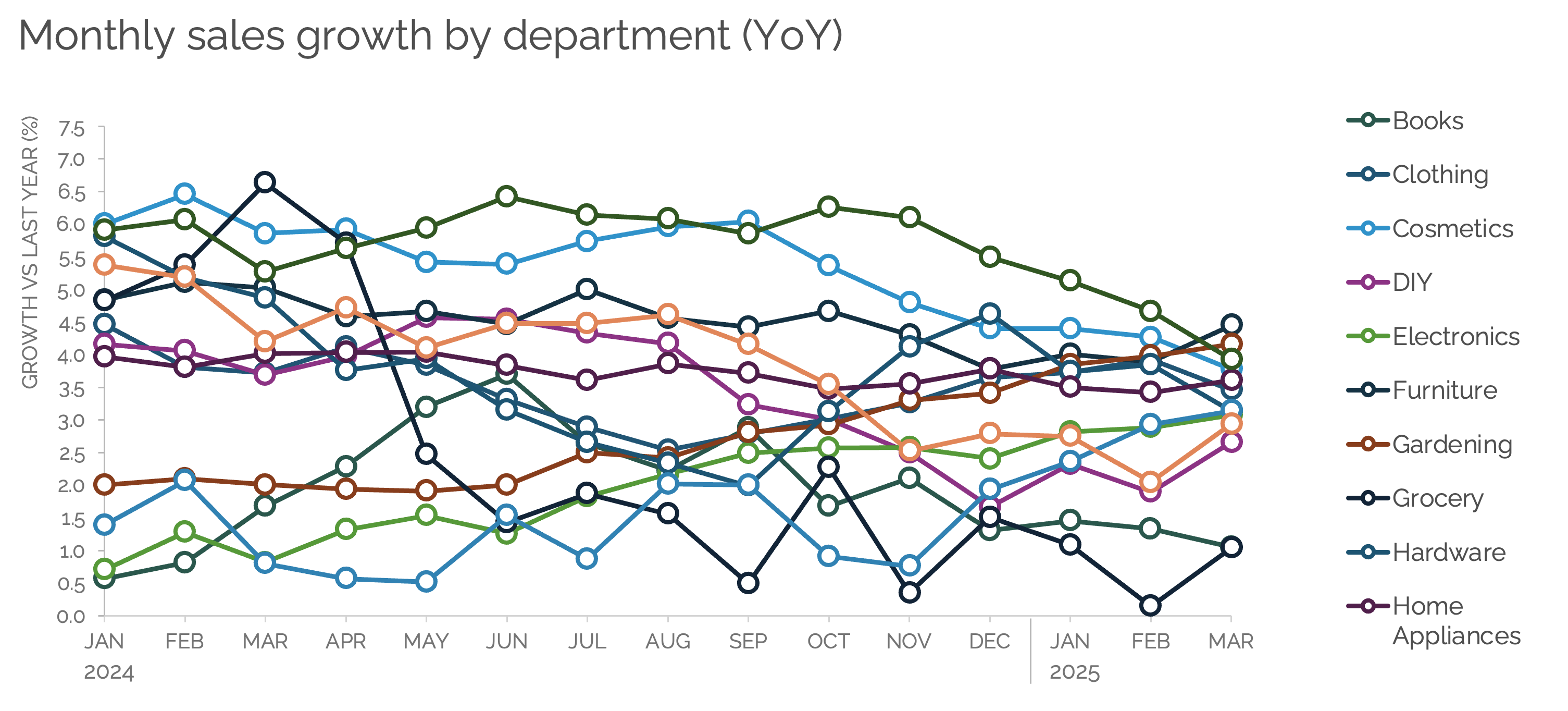
The goal of this month's Storytelling with Data exercise is toresist the temptation to show all the data.
{#fig-1}
Additional information can be found [HERE](https://community.storytellingwithdata.com/exercises/resist-the-temptation-to-show-all-the-data)
### Makeover
{#fig-1}
### <mark> __Steps to Create this Graphic__ </mark>
#### 1. Load Packages & Setup
```{r}
#| label: load
if (!require("pacman")) install.packages("pacman")
pacman::p_load(
  tidyverse,         # Easily Install and Load the 'Tidyverse'
  ggtext,            # Improved Text Rendering Support for 'ggplot2'
  showtext,          # Using Fonts More Easily in R Graphs
  scales,            # Scale Functions for Visualization
  glue,              # Interpreted String Literals
  here,              # A Simpler Way to Find Your Files
  janitor,           # Simple Tools for Examining and Cleaning Dirty Data
  camcorder,         # Record Your Plot History,
  ggrepel,           # Automatically Position Non-Overlapping Text Labels with 'ggplot2'
  patchwork          # The Composer of Plots # The Composer of Plots # The Composer of Plots
)

### |- figure size ----
gg_record(
  dir    = here::here("temp_plots"),
  device = "png",
  width  = 8,
  height = 10,
  units  = "in",
  dpi    = 320)
# Source utility functions
suppressMessages(source(here::here("R/utils/fonts.R")))
source(here::here("R/utils/social_icons.R"))
source(here::here("R/utils/image_utils.R"))
source(here::here("R/themes/base_theme.R"))
```
#### 2. Read in the Data
```{r}
#| label: read
raw_data <- read_csv(
  here::here("data/swdexercise056.csv")
  ) |>
  clean_names()
```
#### 3. Examine the Data
```{r}
#| label: examine
#| include: true
#| eval: true
#| results: 'hide'
#| warning: false
glimpse(raw_data)
```
#### 4. Tidy Data
```{r}
#| label: tidy
tidy_data <- raw_data |>
  rename(month = column1, year = column2) |>
  mutate(
    date = as.Date(paste(year, month, "01", sep = "-"),
                   format = "%Y-%b-%d")
  ) |>
  select(date, everything(), -month, -year) |>
  pivot_longer(
    cols = -date,
    names_to = "department",
    values_to = "growth"
  ) |>
  mutate(
    year_month = format(date, "%b %Y"),
    quarter = paste0("Q", quarter(date)),
    year_quarter = paste(year(date), quarter, sep = "-")
  )

# Compute summary statistics for each department
summary_stats <- tidy_data |>
  group_by(department) |>
  summarise(
    mean_growth = mean(growth, na.rm = TRUE),
    min_growth = min(growth, na.rm = TRUE),
    max_growth = max(growth, na.rm = TRUE),
    sd_growth = sd(growth, na.rm = TRUE),
    range_growth = max_growth - min_growth,
    cv_growth = sd_growth / abs(mean_growth),
    .groups = 'drop'
  ) |>
  arrange(desc(sd_growth))

# Summary statistics
stats_table <- summary_stats |>
  select(department, mean_growth, sd_growth, min_growth, max_growth, range_growth) |>
  mutate(across(where(is.numeric), ~ round(., 2)))

# Identify the most volatile departments (using SD as criteria)
volatile_departments <- summary_stats |>
  slice_max(order_by = sd_growth, n = 3) |>
  pull(department)

# Prepare the data for plotting
highlight_data <- tidy_data |>
  filter(department %in% volatile_departments)
```
#### 5. Visualization Parameters
```{r}
#| label: params
# Get the departments in the correct order (by volatility)
volatile_departments <- summary_stats |>
  slice_max(order_by = sd_growth, n = 3) |>
  pull(department)

# Create a categorical palette for three volatile departments
cat_colors <- c(
  "grocery" = "#0F62FE",
  "hardware" = "#FF7EB6",
  "toys" = "#6929C4"
)

# Get the rest of the departments
other_departments <- setdiff(unique(tidy_data$department), volatile_departments)

# Create a palette for all departments (both highlighted and non-highlighted)
all_dept_colors <- c(cat_colors,
                     setNames(rep("gray80", length(other_departments)),
                              other_departments))

# Colors theme function
colors <- get_theme_colors(
  palette = all_dept_colors
)

### |-  titles and caption ----
title_text <- str_glue("Retail Department Performance Analysis: Growth and Volatility")
subtitle_text <- str_glue("Understanding stability patterns and growth trajectories across retail categories\n(Jan 2024 - Mar 2025)")

# Format the names with colors for the descriptive title
grocery_color <- cat_colors["grocery"]
hardware_color <- cat_colors["hardware"]
toys_color <- cat_colors["toys"]

# P1 chart title
rich_title <- glue::glue(
  "<span style='color:{grocery_color}'>Grocery</span>, ",
  "<span style='color:{hardware_color}'>Hardware</span>, and ",
  "<span style='color:{toys_color}'>Toys</span> are the three most volatile departments"
)

# P2 chart title
rich_title_p2 <- glue::glue(
  "<span style='color:{grocery_color}'>Grocery</span> shows highest volatility despite below-average growth"
)

# Create caption
caption_text <- create_swd_exe_caption(
  year = 2025,
  month = "Mar",
  source_text =  "Let's Practice! Exercise 5.6"
)

### |-  fonts ----
setup_fonts()
fonts <- get_font_families()

### |-  plot theme ----

# Start with base theme
base_theme <- create_base_theme(colors)

# Add weekly-specific theme elements
weekly_theme <- extend_weekly_theme(
  base_theme,
  theme(
    # Text styling
    plot.title = element_text(face = "bold", family = fonts$title, color = colors$title, size = rel(1.14), margin = margin(b = 10)),
    plot.subtitle = element_text(family = fonts$subtitle, color = colors$text, size = rel(0.78), margin = margin(b = 20)),

    # Axis elements
    axis.title = element_text(color = colors$text, size = rel(0.8)),
    axis.text = element_text(color = colors$text, size = rel(0.7)),

    # Grid elements
    panel.grid.minor = element_blank(),
    panel.grid.major = element_line(color = "grey95", linewidth = 0.1),

    # Legend elements
    legend.position = "plot",
    legend.title = element_text(family = fonts$text, size = rel(0.8)),
    legend.text = element_text(family = fonts$text, size = rel(0.7)),

    # Plot margins
    plot.margin = margin(t = 10, r = 10, b = 10, l = 10),
  )
)

# Set theme
theme_set(weekly_theme)
```
#### 6. Plot
```{r}
#| label: plot
# P1. Line Chart ----
p1 <- ggplot() +
  # Geoms
  geom_hline(
    yintercept = 0, color = "gray30", alpha = 0.5, linewidth = 0.5
  ) +
  geom_line(data = tidy_data,
            aes(x = date, y = growth, group = department),
            color = "gray", linewidth = 0.2, alpha = 0.8
  ) +
  geom_line(data = highlight_data,           # Highlighted volatile departments
            aes(x = date, y = growth, color = department),
            linewidth = 1.2
  ) +
  geom_point(data = highlight_data,
             aes(x = date, y = growth, color = department),
             size = 2
  ) +
  geom_text_repel(
    data = highlight_data |>
      group_by(department) |>
      filter(date == max(date)),
    aes(x = date, y = growth, label = str_to_title(department), color = department),
    hjust = -0.2, size = 4, fontface = "bold",
    direction = "y", segment.color = "gray50",
    box.padding = 0.5, point.padding = 0.3
  ) +

  # Scales
  scale_x_date(
    date_breaks = "2 months",
    date_labels = "%b\n%Y",
    expand = expansion(mult = c(0.01, 0.1))
  ) +
  scale_y_continuous(
    labels = function(x) paste0(x, "%"),
    breaks = seq(-3, 7, by = 1)
  ) +
  scale_color_manual(values = cat_colors) +
  # Labs
  labs(
    title = rich_title,
    subtitle = "Department Year-over-Year Growth Trends",
    y = NULL,
    x = NULL,
  ) +
  # Theme
  theme(
    panel.grid.major.y = element_line(color = "gray90"),
    plot.title = element_markdown(
      size = rel(1.1),
      family = fonts$title,
      face = "bold",
      margin = margin(b = 10)
    )
  )

# P2. Scatter Plot ----
p2 <- ggplot(summary_stats,
             aes(x = mean_growth, y = sd_growth, label = department)) +
  # Geoms
  geom_point(
    aes(color = department, size = range_growth),
    alpha = 0.8
  ) +
  geom_text_repel(
    size = 3.5,
    box.padding = 0.5,
    max.overlaps = 15,
    segment.color = "gray70"
  ) +
  # Scales
  scale_color_manual(
    values = all_dept_colors  # applies the same colors to all departments
  ) +
  scale_size_continuous(range = c(2, 6)) +
  labs(
    title = rich_title_p2,
    subtitle = "Department Performance: Comparing Growth and Volatility",
    x = "Mean Growth Rate (%)",
    y = NULL
  ) +
  # Theme
  theme(
    plot.title = element_markdown(
      size = rel(1.1),
      family = fonts$title,
      face = "bold",
      margin = margin(b = 10)
    ),
    panel.grid.minor = element_blank(),
    panel.grid.major = element_line(color = "grey70", linewidth = 0.1),
  )

# Combined Plot -----
combined_plot <- (p1 / p2) +
  plot_layout(heights = c(1, 1))

combined_plot <- combined_plot +
  plot_annotation(
    title = title_text,
    subtitle = subtitle_text,
    caption = caption_text,
    theme = theme(
      plot.title = element_text(
        size = rel(1.4),
        family = fonts$title,
        face = "bold",
        color = colors$title,
        lineheight = 1.1,
        margin = margin(t = 5, b = 5)
      ),
      plot.subtitle = element_text(
        size = rel(0.95),
        family = fonts$subtitle,
        color = colors$subtitle,
        lineheight = 1.2,
        margin = margin(t = 5, b = 10)
      ),
      plot.caption = element_markdown(
        size   = rel(0.65),
        family = fonts$caption,
        color  = colors$caption,
        hjust  = 0.5,
        margin = margin(t = 10)
      ),
      plot.margin = margin(t = 20, r = 10, b = 20, l = 10),
    ))
```
#### 7. Save
```{r}
#| label: save
### |-  plot image ----

source(here::here("R/image_utils.R"))
save_plot_patchwork(
  combined_plot,
  type = 'swd',
  year = 2025,
  month = 03,
  exercise = 056,
  width = 8,
  height = 10
  )
```
#### 8. Session Info
::: {.callout-tip collapse="true"}
##### Expand for Session Info
```{r, echo = FALSE}
#| eval: true
#| warning: false
sessionInfo()
```
:::
#### 9. GitHub Repository
::: {.callout-tip collapse="true"}
##### Expand for GitHub Repo
The complete code for this analysis is available in [`swd_2025_02-Ex_056.qmd`](https://github.com/poncest/personal-website/tree/master/data_visualizations/SWD%20Challenge/2025/swd_2025_02-Ex_056.qmd).
For the full repository, [click here](https://github.com/poncest/personal-website/).
:::
#### 10. References
::: {.callout-tip collapse="true"}
##### Expand for References
Data Sources:
1. Data Sources:
- Storytelling with Data Exercise | resist the temptation to show all the data: [Download the data](https://community.storytellingwithdata.com/exercises/resist-the-temptation-to-show-all-the-data)
:::

